Stoneridge tahhograafi sidumine
Stoneridge'i tahhograafi sidumine erineb VDO seadmetest. Allpool kirjeldame Bluetooth sidumise samme Stoneridge'i tahhograafiga.
Eeltingimused
- ✓Juhikaart peab olema sisestatud tahhograafi
- ✓Tahhograafi Bluetooth funktsioon peab olema sisse lülitatud
- ✓Telefoni Bluetooth peab olema sisse lülitatud
- ✓TachoData rakendus peab olema telefonis avatud
Tahhograafi Bluetoothi toe kontrollimine
Stoneridge tahhograafid toetavad Bluetoothi alates GEN2 v2 (Smart 2) põlvkonnast. Oma seadme põlvkonda saate kontrollida järgmiselt:
- Printige tahhograafist 24-tunnine või tehniline nimekiri
- Väljatrüki alaosast leidke tootja päiseplokk (Stoneridge Electronics · Örebro)
- Tootja nime all näete osanumbrit, aastat ja põlvkonna märgistust (nt
GEN2 v2) - Kui märgistus on "GEN2 v2 · V 1619 · 21/12/2023" või uuem → tahhograaf toetab Bluetoothi ja seda saab rakendusega paaristada
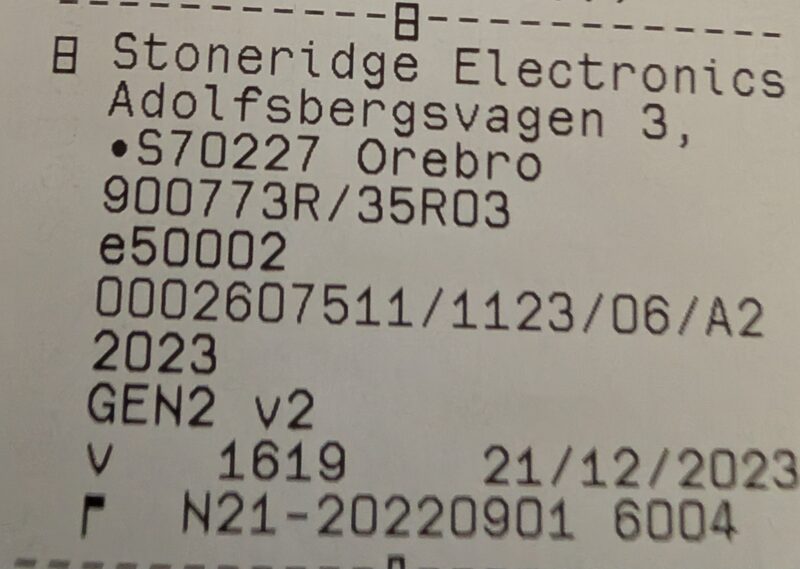
Vanemad Stoneridge tahhograafid
Kui märgistus on ainult "GEN2" või "GEN1" — tahhograaf ei toeta Bluetooth-sidet. Sellisel juhul kasutage andmete allalaadimiseks esiseadet (Front Device).
Tähtis!
Sidumine kehtib alati samade juhikaartide samale paigutusele — üksinda sõites ainult teie enda kaardile. Kui sõidumeerikusse sisestatakse teine kaart või kui teie kaart paigutatakse teise pessa, tuleb varasem sidumine kustutada nii sõidumeerikust kui ka telefonist.
Rakendused TachoData ja TachoAI tuvastavad automaatselt lähedalasuvad sõidumeerikud, mida saab siduda, samuti need, mis on juba seotud.
Sidumise sammud Stoneridge'i tahhograafil
- Avage tahhograafi peamenüü
- Navigeerige Bluetooth seadete menüüpunkti
- Valige „Seo uus seade" valik
- Tahhograaf otsib saadaolevaid seadmeid
- Valige oma telefon loendist
- Kinnitage sidumiskood mõlemas seadmes
- Oodake, kuni sidumine on edukalt lõpule viidud
Hoiatus!
Sarnaselt VDO tahhograafidele on sidumine seotud tahhograafi JA sellesse sisestatud juhikaartidega. Kui kaardid muutuvad, tuleb sidumine kustutada ja uuesti luua!
Sidumise eemaldamine
Kui sidumine ei tööta või juhikaardid on muutunud:
1. Eemaldage telefonist
- Avage telefoni Seadete menüü
- Minge Bluetooth jaotisesse
- Leidke Stoneridge'i tahhograafi nimi
- Valige „Unusta seade"
2. Eemaldage tahhograafist
- Avage tahhograafi Bluetooth seadete menüü
- Leidke telefoni nimi seotud seadmete loendist
- Valige kustutamise valik
Nõuanne
Enne uuesti sidumist tuleb sidumine eemaldada mõlemast seadmest.
Kui allalaadimine ei käivitu pärast sidumist
Kui allalaadimine ei käivitu pärast sidumist või sõidumeerik „ei vasta“: tavaliselt ei ole see sidumisviga. Vaata jaotist Tõrkeotsing → „Sõidumeerik ei vasta“. Kiireim lahendus: lülita süüde välja ja seejärel uuesti sisse ning proovi uuesti; veendu, et sõidumeerikus on samad kaardid nagu sidumise ajal.