VDO tachografo poravimas
VDO tachografo susiejimas per Bluetooth leidžia tiesiogiai atsisiųsti duomenis iš vairuotojo kortelės per tachografą į programėlę.
Išankstinės sąlygos
- ✓Vairuotojo kortelė turi būti įdėta į tachografą
- ✓Tachografas turi būti su Bluetooth funkcija (G2V2 Smart karta)
- ✓Telefono Bluetooth turi būti įjungtas
- ✓Programėlė TachoData arba TachoAI turi būti atidaryta telefone
Patikrinimas, ar tachografas palaiko Bluetooth
VDO tachografai palaiko Bluetooth nuo GEN2 v2 (Smart 2) kartos. Savo prietaiso kartą galite patikrinti taip:
- Iš tachografo atspausdinkite 24 valandų arba techninį sąrašą
- Spaudinio apačioje suraskite gamintojo antraštės bloką (Continental Automotive Technologies · VS-Villingen)
- Po gamintojo pavadinimu nurodytas dalies numeris, metai ir kartos žymuo (pvz.,
GEN2 v2) - Jei žymuo yra „GEN2 v2 · V 4141 · 15.09.2025“ arba naujesnis → tachografas palaiko Bluetooth ir gali būti suporuotas su programėle
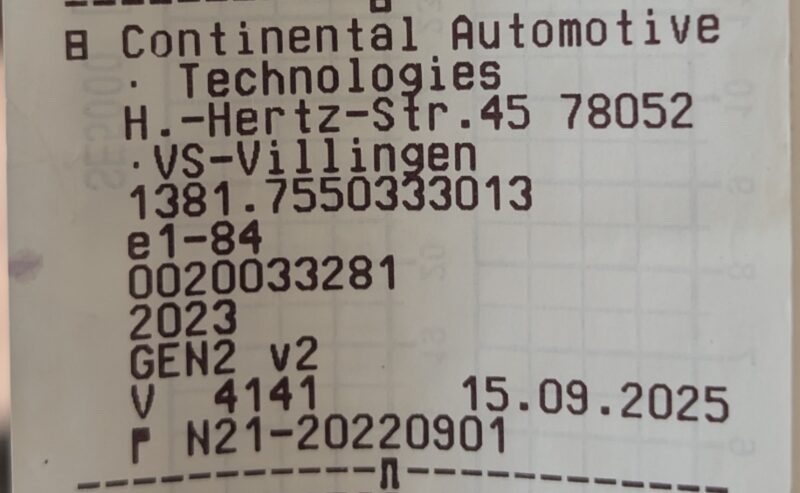
Senesni VDO tachografai
Jei žymuo yra tik „GEN2“ arba „GEN1“ — tachografas nepalaiko Bluetooth ryšio. Tokiu atveju duomenų atsisiuntimui naudokite priekinį įrenginį (Front Device).
Svarbu!
Susiejimas visada taikomas tai pačiai tų pačių vairuotojo kortelių išdėstymo tvarkai — vairuojant vienam, tik Jūsų pačių kortelei. Jei į tachografą įdedama kita kortelė arba Jūsų kortelė perkeliama į kitą lizdą, ankstesnis susiejimas turi būti ištrintas tiek tachografe, tiek telefone.
Patarimas – kad kitas vairuotojas neužstrigtų
Prieš perduodami transporto priemonę kitam vairuotojui arba pereidami prie kitos kortelės, ištrinkite susiejimą, kol jūsų kortelė dar yra įrenginyje (žr. Susiejimo ištrynimas). Jei ankstesnis susiejimas pašalintas, susiejimas ir nuskaitymas su nauja kortele veikia iš karto ir be klaidų.
TachoData ir TachoAI programėlės automatiškai aptinka šalia esančius tachografus, kuriuos galima susieti, taip pat ir jau susietus.
Susiejimo veiksmai tachografe
- Paspauskite OK mygtuką tachografe
- Paspauskite ▼ (žemyn) mygtuką 2 kartus
- Pasirinkite „Driver 1" meniu
- Paspauskite OK mygtuką
- Paspauskite ▲ (aukštyn) mygtuką 2 kartus
- Pasirinkite „Bluetooth" meniu punktą
- Paspauskite OK mygtuką
- Pasirinkite „Pair" (Susieti) parinktį
- Pasirinkite savo telefoną iš sąrašo
- Patvirtinkite susiejimo kodą abiejuose įrenginiuose
Dėmesio!
Susiejimas yra susietas su tachografu IR visomis į jį įdėtomis vairuotojo kortelėmis. Jei kortelės pasikeičia (pvz., tachografą naudoja kitas vairuotojas), susiejimą reikia ištrinti ir atlikti iš naujo!
Dėmesio! Ankstesnis susiejimas gali blokuoti naują
VDO (DTCO) tachografas vienu metu išlaiko tik vieną aktyvų susiejimą. Jei tachografe jau yra ankstesnis susiejimas — jūsų iš kito telefono ar ankstesnio vairuotojo — ir jis nebuvo ištrintas, tachografas blokuoja naują susiejimą: jis nepavyksta dėl laiko limito (timeout), kiek kartų bebandytumėte.
Ką daryti: pirmiausia ištrinkite ankstesnį susiejimą tachografe (žr. žemiau: „Susiejimo ištrynimas → 2. Ištrynimas tachografe“) ir tik tada pradėkite susiejimą iš naujo. Jei senas įrašas liko ir telefone, ištrinkite jį „Bluetooth“ nustatymuose.
Susiejimo pašalinimas
Kodėl tai svarbu? Ne tik keičiant įrenginį ar vairuotoją: VDO tachografas išlaiko ankstesnį susiejimą ir blokuoja naują, kol jo neištrinsite. Todėl jei susiejimas nuolat nepavyksta dėl laiko limito, pirmiausia čia ištrinkite seną — abiejose pusėse.
Jei vairuotojo kortelės pasikeitė arba susiejimas neveikia tinkamai, galite jį pašalinti taip:
1. Pašalinti iš telefono
- Atidarykite telefono Nustatymus
- Eikite į „Bluetooth" skyrių
- Raskite tachografo pavadinimą tarp susietų įrenginių
- Paspauskite „Pamiršti įrenginį"
2. Pašalinti iš tachografo
Svarbu: kad ištrintumėte susiejimą tachografe, turite įdėti vairuotojo kortelę, su kuria buvo sukurtas susiejimas („originaliąją“ kortelę). Bluetooth meniu tachografas susiejimą priskiria šiai kortelei – su jokia kita kortele ištrinti negalima.
Susiejimą taip pat reikia pašalinti tachografe. Įeikite į „Bluetooth" meniu pagal aukščiau nurodytus veiksmus ir pasirinkite trynimo parinktį šalia telefono pavadinimo.
Patarimas
Susiejimą reikia pašalinti abiejose pusėse (telefone IR tachografe), kitaip pakartotinis susiejimas nepavyks.
Jei originalios kortelės nebėra
Jei vairuotojo kortelės, naudotos susiejimui, nebėra (pvz., vairuotojas išėjo arba transporto priemonė priskirta kitam vairuotojui), vairuotojas šiuo metu negali ištrinti susiejimo tachografe. Tokiu atveju:
- kreipkitės į autoparko vadovą / dispečerį arba
- į oficialią VDO tachografų dirbtuvę, kuri gali panaikinti susiejimą.
Apie šią situaciją pranešėme tachografo gamintojui (VDO / AUMOVIO) ir kuriame nuo kortelės nepriklausantį atrakinimo būdą. Kai tik atsiras oficialus sprendimas, čia atnaujinsime šį vadovą.